Ford Explorer Sport Trac Ford Ranger Mazda Navajo Mercury Mountaineer Message Board
Ford Explorer Sport Trac Ford Ranger Mazda Navajo Mercury Mountaineer Message Board - For Enthusiasts by Enthusiasts


Ford Explorer Generation Guide

2013 Ford Explorer Forums Elite Membership Chat Room My Posts Reviews Explorer Photo Gallery
Go Back   Ford Explorer Ranger Enthusiasts "Serious Explorations"® > Ford Explorer Ranger Repair - Troubleshooting - Modifications & Detailing Forums > 2002 - 2005 Explorer Mountaineer 3rd Generation > Stock 2002 - 2005 Explorers

Notices

Stock 2002 - 2005 Explorers Questions related to non-modified 2002 - 2005 Explorers and Mountaineers. Problem solving, maintenance, TSB, service bulletins, owner reviews, specifications. Sport Trac and Sport use the 1995-2001 forum.

How To: Replace 3rd Gen Ambient Air Temperature Sensor

Reply
 
Thread Tools
Old 01-30-2011, 03:19 PM   #1
BigRondo
USMC 1371
Worcester, MA
 
BigRondo's Avatar
2002 XLT V6 4x4
 
Join Date: Feb 2010
Posts: 7,182

Vehicle Specs

(Original Poster)
How To: Replace 3rd Gen Ambient Air Temperature Sensor

This topic comes up quite a bit, especially in the winter months. I took some pictures today to show someone in another thread where it was located and how to replace it. That led to this write up. I hope this will make short work out of changing the sensor. I got my sensor from the dealer for around $40.00

Be sure to check out my other write ups:

How To: Replace Blend Door Actuator in 3rd Gen Ex

How To: Remove/Replace 3rd Gen Door Panel

How To: Install Signal Mirrors On 3rd Gen Ex

How To: Restore Faded, Yellowing Headlights

How To: Replace Multifunction Switch in 3rd Gen Ex

How To: Paint Rear Pillar Trim

How To: Test a Relay

How To: Remove/Replace 3rd Gen Center Console


Tools/Parts Required

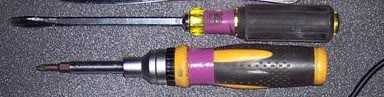
Slotted Screwdriver
Phillips Screwdriver


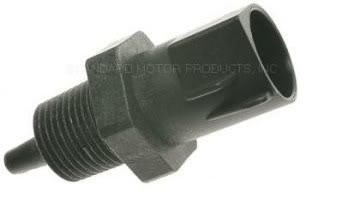
New Ambient Air Temperature Sensor

NOTE: Some have mentioned that the sensor is on the driver's side. My sensor is on the passenger's side. The replacement should be the same for either side.

1. Remove Grille

1.a. Remove plastic screws.
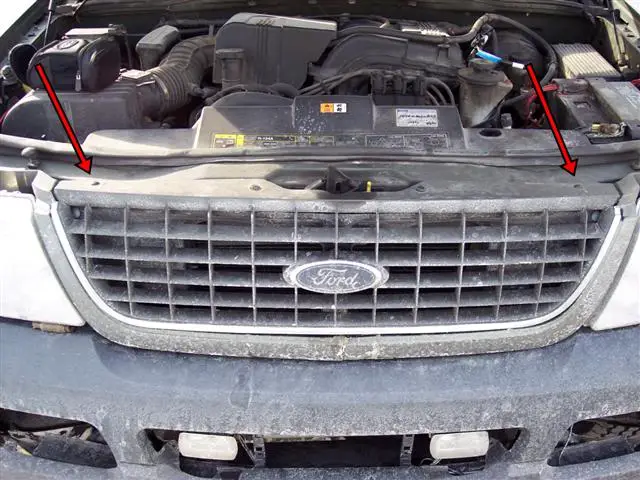


1.b. Use Phillips screwdriver to remove screws. BE CAREFUL NOT TO BREAK THE SCREWS!
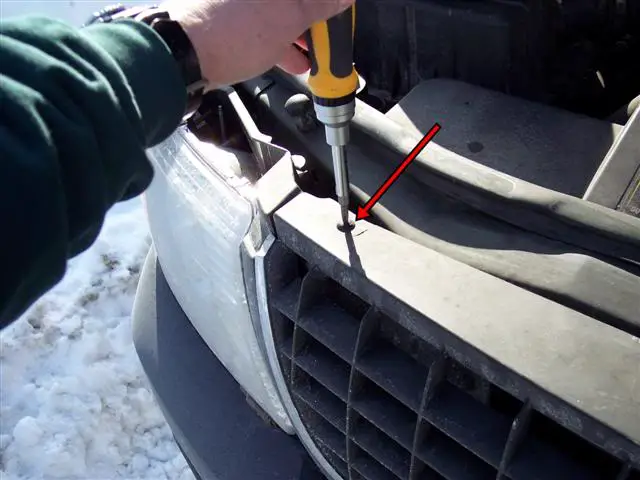


1.c. Remove plastic pins.
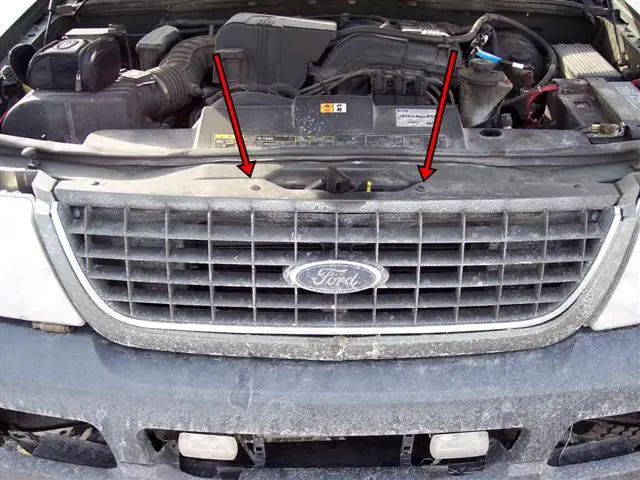


1.d. Use slotted screwdriver to remove pins.
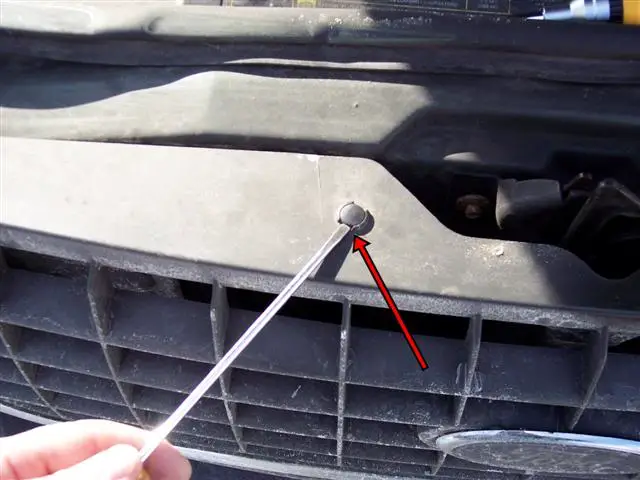


1.e. Lift pin up with screwdriver. BE CAREFUL NOT TO BREAK THE PINS!
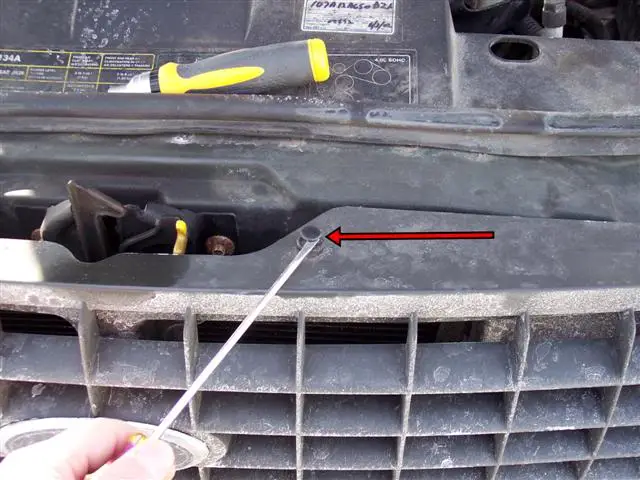


1.f. Remove screw holders and pin holders. Use slotted screwdriver to pry both screw holders and pin holders up and out.
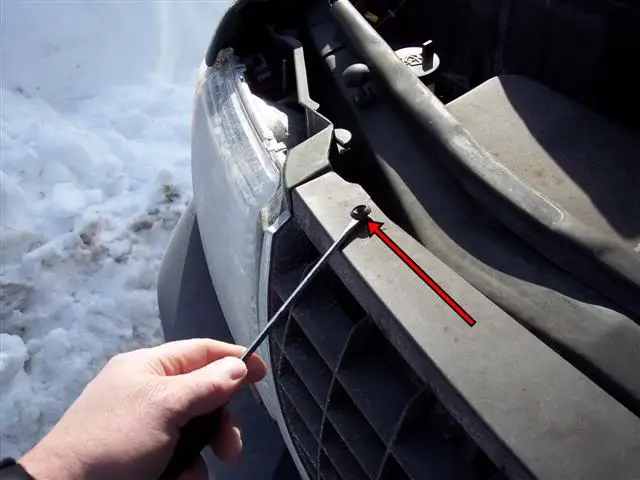


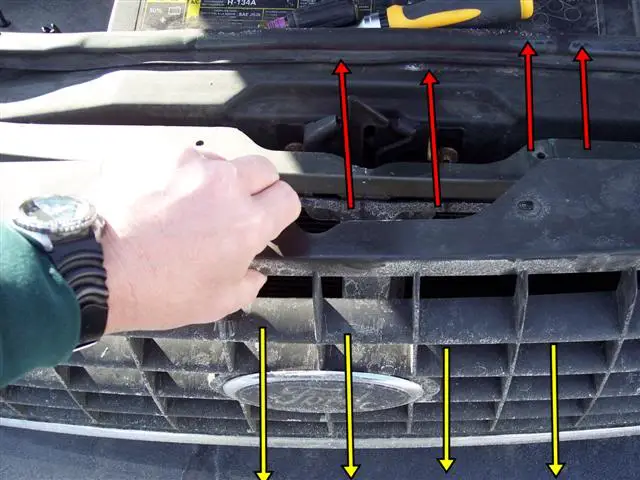
1.g. Lift grille up and out.


2. Disconnect/Replace Sensor

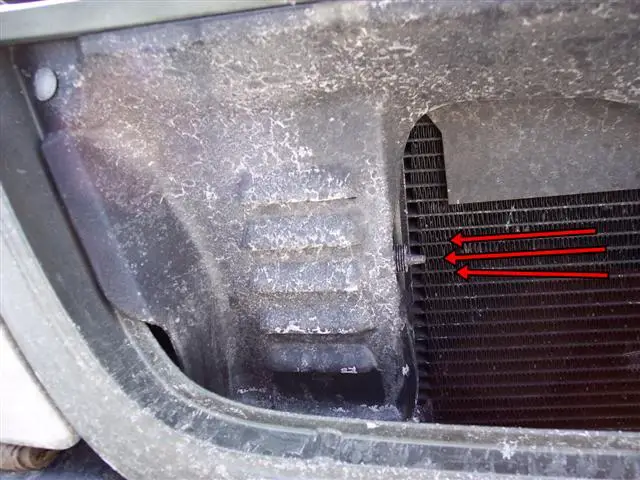
2.a. View of sensor with grille removed.
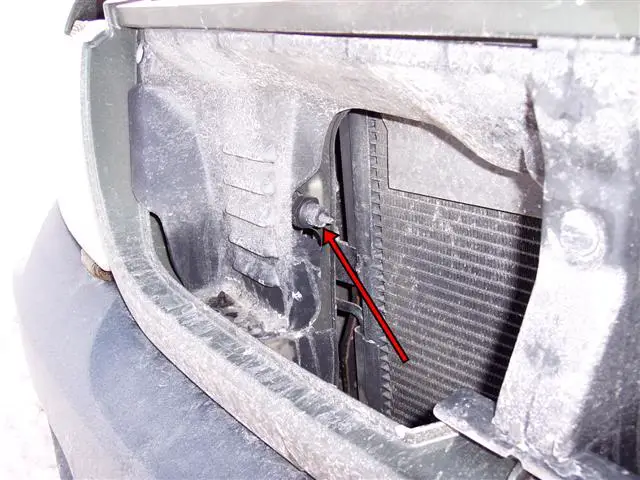


2.b. This panel can be removed for better access. I did not need to remove this panel! The red arrows indicate the pins to remove in order to remove this panel.
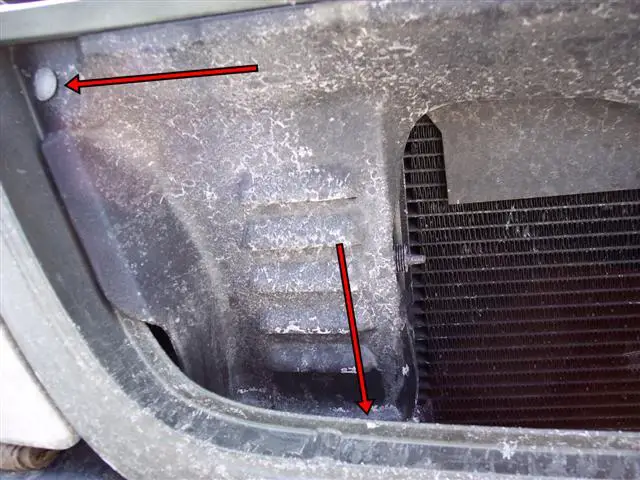


2.c. Side view of connector tab. The sensor is blurry in this picture but the arrow indicates the connector tab.
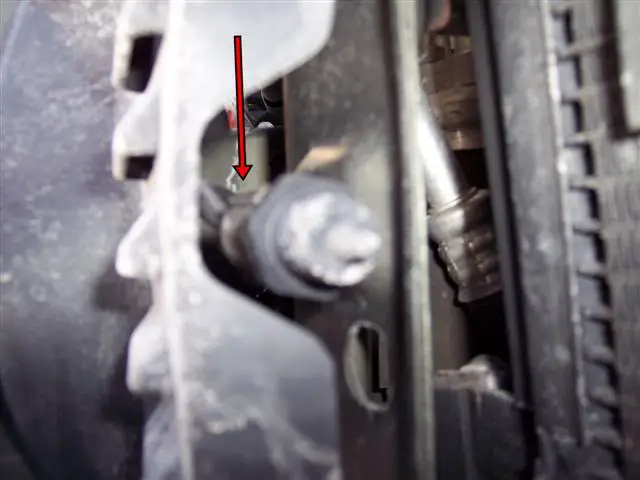


2.d. Top view of connector tab. The sensor is hard to see in this picture. If you look down from the top you will see the connector tab.
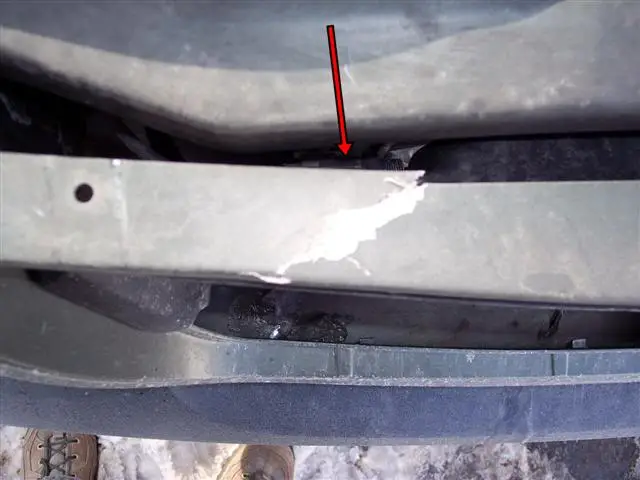


2.e. Lift the connector tab up and pull sensor in direction of arrows to remove sensor.
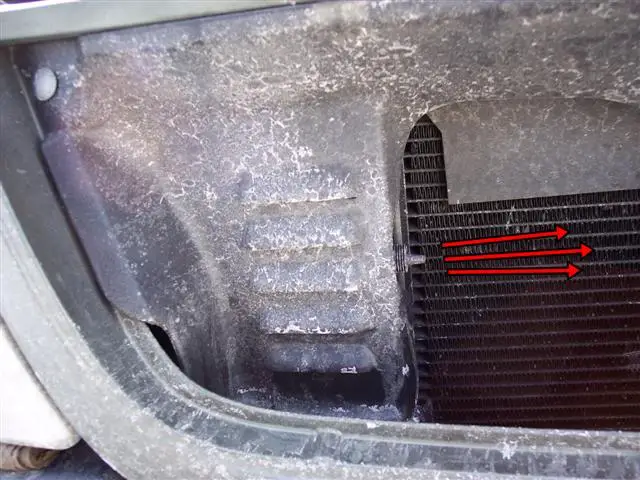


2.f. Push new sensor into place. Line up new sensor with the connector and gently push into place. You should hear the connector tab click. Make sure the sensor is fully seated.


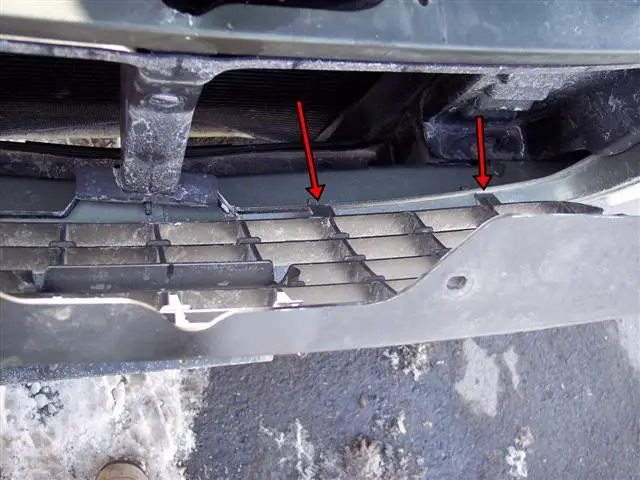
3. Replace Grille

3.a. Place bottom of grille in first. Make sure the tabs indicated by the red arrows are lined up properly.


3.b. Push top of grille toward vehicle. Make sure the holes are lined up.
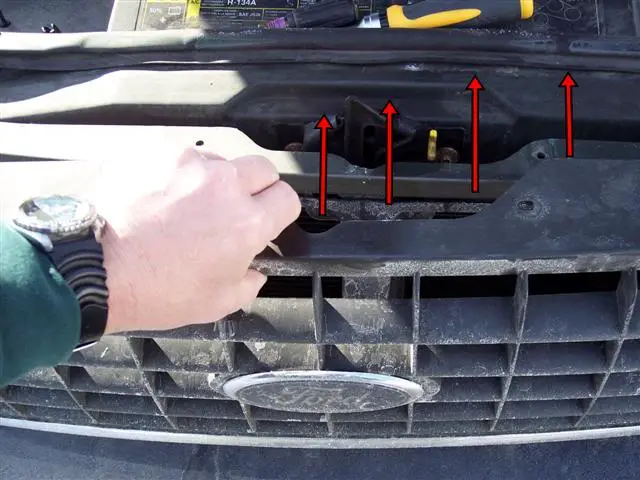


3.c. Insert screw holders and pin holders. Push holders into place.
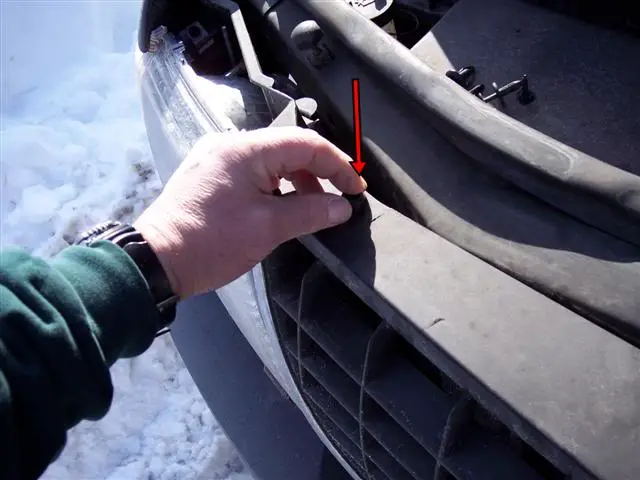


3.d. Push plastic pins into place. Make sure they are fully seated.
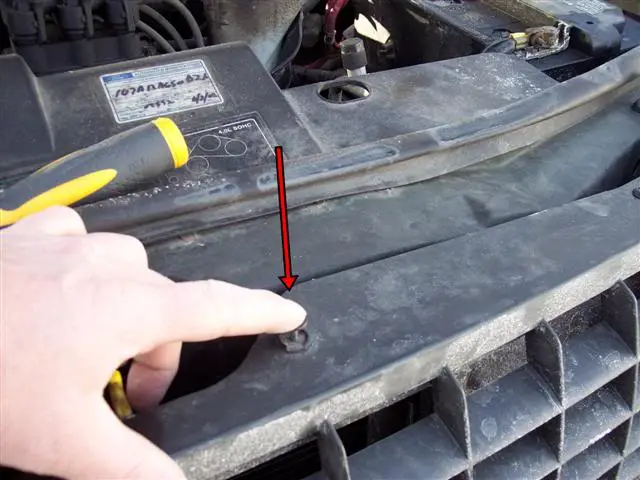


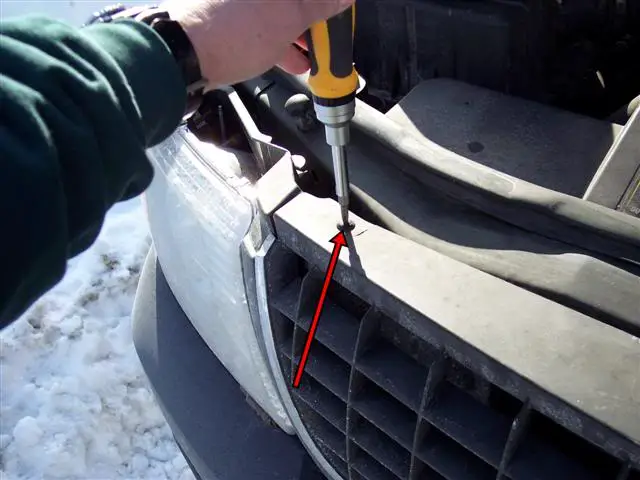
3.e. Use Phillips screwdriver to replace screws. DO NOT OVERTIGHTEN OR THE PLASTIC SCREWS WILL BREAK!


4. You Are Finished!

4.a. Enjoy a Cold Beverage of Your Choosing!!!



Thanks for looking in!


__________________
Rondo - USMC, Combat Engineer, 1983-1996
Click here for a list of my write-ups!

Quote:
Originally Posted by FIND on 4-22-13
Don't mess with Boston. They will drop everything, hunt you down, and then go on like you never existed once they are done cleaning up the mess.

Last edited by BigRondo; 08-24-2012 at 11:32 AM. Reason: Added links.
BigRondo is offline   Reply With Quote
Old 02-05-2011, 02:52 PM   #2
forcemac
 
Join Date: Dec 2010
Posts: 27

Vehicle Specs

Did mine today along with one wheel bearing....i did the temp sensor this morning in the parking lot waiting for the hobby shop to open...it really only takes about 10 min.....although I cussed a bit because the temp was stuck at 50 prior to the replacement...what are chances it would be exactly 50 when I changed it .....it was...didn't know it was fixed until I drove home after the bearing change....
forcemac is offline   Reply With Quote
Old 02-05-2011, 04:58 PM   #3
BigRondo
USMC 1371
Worcester, MA
 
BigRondo's Avatar
2002 XLT V6 4x4
 
Join Date: Feb 2010
Posts: 7,182

Vehicle Specs

(Original Poster)
Good deal. Yeah it's a pretty quick fix. In and out!


__________________
Rondo - USMC, Combat Engineer, 1983-1996
Click here for a list of my write-ups!

Quote:
Originally Posted by FIND on 4-22-13
Don't mess with Boston. They will drop everything, hunt you down, and then go on like you never existed once they are done cleaning up the mess.
BigRondo is offline   Reply With Quote
Old 02-17-2011, 12:45 AM   #4
kdoggy
Grand Rapids, MI
2002 Explorer XLT 4x4
 
Join Date: Feb 2011
Posts: 88

Vehicle Specs

Dumb question!

What exactly is this sensor for? Is this the one that tells me how cold it is outside? I was noticing by my tach it says something like ---F, like the sensor is not working.

Can I assume this is the sensor for this?
kdoggy is offline   Reply With Quote
Old 02-17-2011, 12:25 PM   #5
BigRondo
USMC 1371
Worcester, MA
 
BigRondo's Avatar
2002 XLT V6 4x4
 
Join Date: Feb 2010
Posts: 7,182

Vehicle Specs

(Original Poster)
Quote:
Originally Posted by kdoggy View Post
Dumb question!

What exactly is this sensor for? Is this the one that tells me how cold it is outside? I was noticing by my tach it says something like ---F, like the sensor is not working.

Can I assume this is the sensor for this?
Yes, that display is for the outside temp. Mine was reading in the 50's when it was in the 20's so I swapped it out and it works perfectly now. It was very cold when I snapped this photo and the readout was spot on:


__________________
Rondo - USMC, Combat Engineer, 1983-1996
Click here for a list of my write-ups!

Quote:
Originally Posted by FIND on 4-22-13
Don't mess with Boston. They will drop everything, hunt you down, and then go on like you never existed once they are done cleaning up the mess.
BigRondo is offline   Reply With Quote
Old 02-18-2011, 12:17 PM   #6
kdoggy
Grand Rapids, MI
2002 Explorer XLT 4x4
 
Join Date: Feb 2011
Posts: 88

Vehicle Specs

Nice! I'll have to fix this. I'm cheap though so I'll have to go hit the junk yard and grab a couple of these sensors lol!

Most of the time they tell me to just "take" these types of items. Free is good.
kdoggy is offline   Reply With Quote
Old 02-18-2011, 01:11 PM   #7
Cjpooch
Elite Explorer
Saginaw, MI
 
Cjpooch's Avatar
2002 Ford Explorer XLT
 
Join Date: Dec 2010
Posts: 84

Vehicle Specs

Great write up Rondo. Then again all your write ups are. I'll have to bookmark this in case I ever need to replace mine. This should be a sticky if it isn't already.


__________________
Cheers!
David
02' Explorer XLT 4.0 SOHC, 114,500 Miles
5R55W Transmission
BFG 245/70R16
My (lame) Registry
Cjpooch is offline   Reply With Quote
Old 02-18-2011, 07:25 PM   #8
BigRondo
USMC 1371
Worcester, MA
 
BigRondo's Avatar
2002 XLT V6 4x4
 
Join Date: Feb 2010
Posts: 7,182

Vehicle Specs

(Original Poster)
Quote:
Originally Posted by kdoggy View Post
Nice! I'll have to fix this. I'm cheap though so I'll have to go hit the junk yard and grab a couple of these sensors lol!

Most of the time they tell me to just "take" these types of items. Free is good.
Quote:
Originally Posted by Cjpooch View Post
Great write up Rondo. Then again all your write ups are. I'll have to bookmark this in case I ever need to replace mine. This should be a sticky if it isn't already.
Thanks guys!! Just trying to give back to the forum!


__________________
Rondo - USMC, Combat Engineer, 1983-1996
Click here for a list of my write-ups!

Quote:
Originally Posted by FIND on 4-22-13
Don't mess with Boston. They will drop everything, hunt you down, and then go on like you never existed once they are done cleaning up the mess.
BigRondo is offline   Reply With Quote
Old 02-19-2011, 08:36 AM   #9
jakedrew
wisconsin
04 xlt
 
Join Date: Aug 2009
Posts: 512

Vehicle Specs

thanks for the write up. Hope I dont have to do it.
jakedrew is offline   Reply With Quote
Old 02-20-2011, 11:22 AM   #10
BigRondo
USMC 1371
Worcester, MA
 
BigRondo's Avatar
2002 XLT V6 4x4
 
Join Date: Feb 2010
Posts: 7,182

Vehicle Specs

(Original Poster)
Quote:
Originally Posted by jakedrew View Post
thanks for the write up. Hope I dont have to do it.
You're welcome. 10 minute job. Not bad at all.


__________________
Rondo - USMC, Combat Engineer, 1983-1996
Click here for a list of my write-ups!

Quote:
Originally Posted by FIND on 4-22-13
Don't mess with Boston. They will drop everything, hunt you down, and then go on like you never existed once they are done cleaning up the mess.
BigRondo is offline   Reply With Quote
Old 08-12-2011, 07:09 PM   #11
High_Order1
near Oak Ridge, TN
 
Join Date: Jan 2007
Posts: 488

Vehicle Specs

Wow! Much better write up than mine. Had I seen this, I wouldn't have bothered!

I will say I'm glad to see I wasn't the only one that this affected, though...

Shawn


__________________
____________________________________________
Shawn Hughes

About me / where I've tried to help out here (my back door sticky list)
Please don't PM me. I don't check them enough. Email me if you'd like a response!
High_Order1 is offline   Reply With Quote
Old 08-12-2011, 10:19 PM   #12
BigRondo
USMC 1371
Worcester, MA
 
BigRondo's Avatar
2002 XLT V6 4x4
 
Join Date: Feb 2010
Posts: 7,182

Vehicle Specs

(Original Poster)
Quote:
Originally Posted by High_Order1 View Post
Wow! Much better write up than mine. Had I seen this, I wouldn't have bothered!

I will say I'm glad to see I wasn't the only one that this affected, though...

Shawn
You sir are welcome!!


__________________
Rondo - USMC, Combat Engineer, 1983-1996
Click here for a list of my write-ups!

Quote:
Originally Posted by FIND on 4-22-13
Don't mess with Boston. They will drop everything, hunt you down, and then go on like you never existed once they are done cleaning up the mess.
BigRondo is offline   Reply With Quote
Old 08-15-2011, 09:07 AM   #13
joejv4
 
Join Date: Jan 2011
Posts: 9

Vehicle Specs

Really nice writeup - my wife's '05 Explorer is reading 15-20 higher than actual outside temps, and she wants me to fix it. Looks like one that is actually not too bad to do. Thanks for the great writeup and nice job with the accompanying photos. Looks like you've got a nice coat of road salt - gotta be from a northern climate like me (the -16 deg is another clue on that account)
joejv4 is offline   Reply With Quote
Old 08-15-2011, 04:02 PM   #14
BigRondo
USMC 1371
Worcester, MA
 
BigRondo's Avatar
2002 XLT V6 4x4
 
Join Date: Feb 2010
Posts: 7,182

Vehicle Specs

(Original Poster)
Quote:
Originally Posted by joejv4 View Post
Really nice writeup - my wife's '05 Explorer is reading 15-20 higher than actual outside temps, and she wants me to fix it. Looks like one that is actually not too bad to do. Thanks for the great writeup and nice job with the accompanying photos. Looks like you've got a nice coat of road salt - gotta be from a northern climate like me (the -16 deg is another clue on that account)
Plenty of salt up here brother!! Good luck with the fix!!

Please keep us posted as feedback helps others reading this post looking for a fix to the same or similar issue!


__________________
Rondo - USMC, Combat Engineer, 1983-1996
Click here for a list of my write-ups!

Quote:
Originally Posted by FIND on 4-22-13
Don't mess with Boston. They will drop everything, hunt you down, and then go on like you never existed once they are done cleaning up the mess.
BigRondo is offline   Reply With Quote
Old 11-01-2011, 11:47 AM   #15
nickf
2004 Explorer XLS
 
Join Date: Nov 2011
Posts: 1

Vehicle Specs

Is the temperature gauge standard on all Explorers???? I dont think i have one on mine.... 2004 XLS.
nickf is offline   Reply With Quote
Old 11-01-2011, 08:49 PM   #16
BigRondo
USMC 1371
Worcester, MA
 
BigRondo's Avatar
2002 XLT V6 4x4
 
Join Date: Feb 2010
Posts: 7,182

Vehicle Specs

(Original Poster)
Quote:
Originally Posted by nickf View Post
Is the temperature gauge standard on all Explorers???? I dont think i have one on mine.... 2004 XLS.
Welcome aboard!!

I don't believe it is standard. I don't know if it was available on the XLS.

Follow the instructions to locate the sensor. If there is a sensor there, then I would say you have it. Not trying to be a smarta$$.

Hope this helps out.

Please keep us posted as feedback helps others reading this post looking for a fix to the same or similar issue!


__________________
Rondo - USMC, Combat Engineer, 1983-1996
Click here for a list of my write-ups!

Quote:
Originally Posted by FIND on 4-22-13
Don't mess with Boston. They will drop everything, hunt you down, and then go on like you never existed once they are done cleaning up the mess.
BigRondo is offline   Reply With Quote
Old 12-13-2011, 09:57 PM   #17
High_Order1
near Oak Ridge, TN
 
Join Date: Jan 2007
Posts: 488

Vehicle Specs

Well,

the computers use that sensor to determine a few things, so I am betting the odds are good that it is there. If you have a computer display, you have the outdoor temp display. Also, seems like there may have been an overhead console or rear view mirror display, too. If you don't have these, you won't have the display.

Shawn


__________________
____________________________________________
Shawn Hughes

About me / where I've tried to help out here (my back door sticky list)
Please don't PM me. I don't check them enough. Email me if you'd like a response!
High_Order1 is offline   Reply With Quote
Old 02-19-2012, 08:30 PM   #18
skysthelymyt
Florence, SC
2003 Explorer
 
Join Date: Sep 2011
Posts: 124

Vehicle Specs

Can one of these sensors be added to a trim model that does not have this feature?
Is it just the sensor, wires, and the specific instrument cluster for it? Or is there more to it than that?


__________________
2003 Explorer 4.0
Volant CAI
Volt HID headlights/DDM Tuning HID fogs
BTF (2/1.5) spacers
Underdrive pulley
Spartan Locker
skysthelymyt is offline   Reply With Quote
Old 02-20-2012, 02:26 PM   #19
BigRondo
USMC 1371
Worcester, MA
 
BigRondo's Avatar
2002 XLT V6 4x4
 
Join Date: Feb 2010
Posts: 7,182

Vehicle Specs

(Original Poster)
Quote:
Originally Posted by skysthelymyt View Post
Can one of these sensors be added to a trim model that does not have this feature?
Is it just the sensor, wires, and the specific instrument cluster for it? Or is there more to it than that?
Sorry, I have no idea how much would have to exist from the factory in order to make this work. Maybe someone with more knowledge than me will chime in.

Sorry I couldn't be more help.


__________________
Rondo - USMC, Combat Engineer, 1983-1996
Click here for a list of my write-ups!

Quote:
Originally Posted by FIND on 4-22-13
Don't mess with Boston. They will drop everything, hunt you down, and then go on like you never existed once they are done cleaning up the mess.
BigRondo is offline   Reply With Quote
Old 02-28-2012, 11:36 AM   #20
jpw01
MN
02 Ltd. V8
 
Join Date: Jul 2011
Posts: 5

Vehicle Specs

Has anyone found any other solution to this improper temp problem, ie cleaning the sensor or cleaning/reseating the contacts at the sensor, etc? Mine just started reading about 10F high for no apparent reason. It actually displays the correct temp upon a cold startup in the AM, but once I start driving and the engine heats up, the display temp climbs 10-12F. I'm sure there is a bit of salt film on it.

Thanks for the info!
jpw01 is offline   Reply With Quote
Reply

Suggest this thread to friends:


Tags
outdoor temp sensor, temp, temp gauge, temp sensor, temperature


Join the "Elite Explorers" Today!


Search Explorer Forum


Top of Page

Thread Tools

Posting Rules
You may not post new threads
You may not post replies
You may not post attachments
You may not edit your posts

BB code is On
Smilies are On
[IMG] code is On
HTML code is Off

Forum Jump


All times are GMT -5. The time now is 06:09 AM.


US Flag
We Support Our Troops!

Explore the site!


Copyright 2013 - 1996 Rick Horwitz Photography


This site is not endorsed or affiliated

with the Ford Motor Company in any way.


All tips on this site are for use at your own risk and discretion.

Modifying the suspension on any vehicle will cause changes to its handling characteristics.


Vendor Tools vBulletin Plugins by Drive Thru Online, Inc.